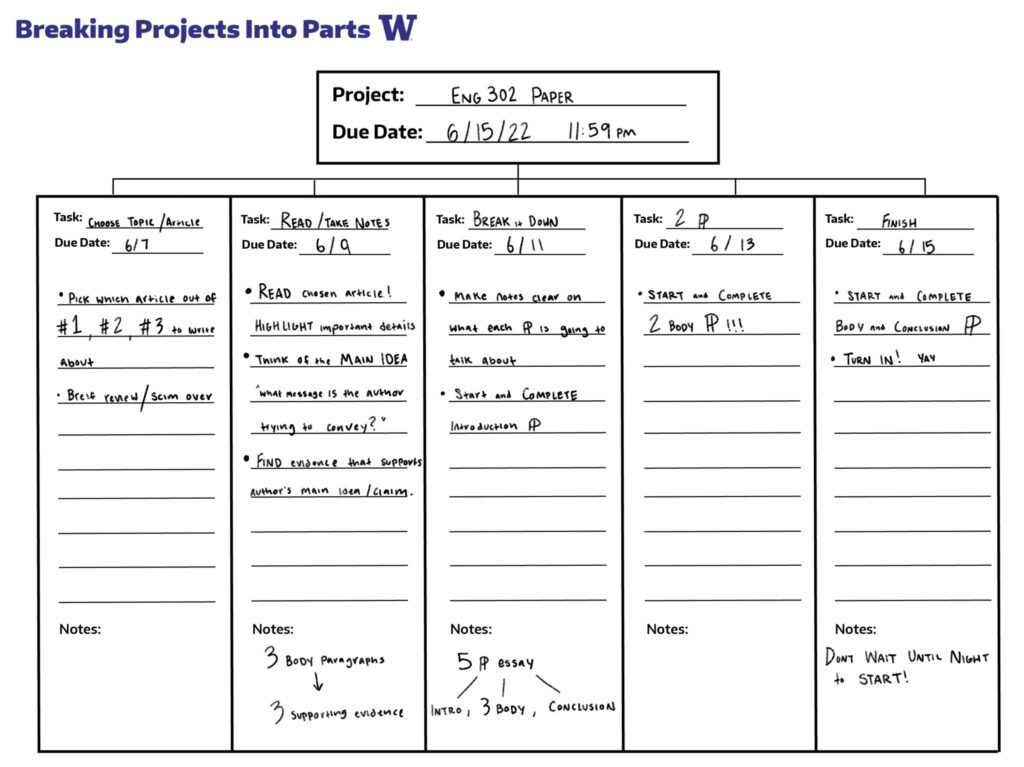
Learning how to break a big project into smaller manageable steps is the single most useful productivity skill you can build. Big projects feel overwhelming not because they are too hard, but because the brain cannot see the path from “start” to “done.” When everything sits in your head as one giant blob of work, you freeze. The moment you slice that blob into clear, small, ordered steps, the project becomes something you can actually start — and finish. This guide walks you through a proven 10-step method, with a full worked example, common mistakes, and answers to the most frequent questions.
Why Big Projects Feel So Overwhelming
There is a well-known psychological pattern behind project paralysis. Your brain treats an undefined task (“write the report,” “renovate the kitchen,” “launch the website”) as a threat because it cannot estimate the effort, the order, or the risks. This is why you can spend weeks thinking about a project without doing anything. It is not laziness — it is a planning problem. The cure is to convert the vague project into a concrete list of small actions, each so simple that starting it feels easy. Once the path is visible, momentum takes over, and each completed step gives you a small win that fuels the next one.
The 10-Step Method to Break a Big Project Into Smaller Steps
Step 1: Define What “Done” Looks Like
Write one or two sentences describing the finished project in specific terms. “A finished project” should be observable and verifiable — something a stranger could check. For example:
- Vague: “Clean up my finances.”
- Clear: “A spreadsheet listing every account and debt, plus an automatic monthly savings transfer set up.”
- Vague: “Plan the party.”
- Clear: “Venue booked, invitations sent, food ordered, and decorations set up by Saturday evening.”
This definition is your compass. Every smaller step you create later must move you measurably toward this picture. Without it, tasks multiply in all directions and the project drifts.
Step 2: Brain-Dump Every Task You Can Think Of
Set a timer for 15 minutes and write down everything the project might involve — big, small, obvious, uncertain. Do not organize yet. Do not judge whether an item is too small or too big. The goal is to get it out of your head and onto paper or screen. A brain dump for “launch a small online store” might include: choose a platform, photograph products, write descriptions, set prices, create a logo, open a business bank account, figure out shipping, write return policy, test checkout, and so on. Quantity first — quality comes later.
Step 3: Group Items Into Phases or Milestones
Look at your dump and sort the items into 3 to 6 phases — natural chapters of the project. For the online store: Research (platform, shipping, pricing), Build (photos, descriptions, logo, policies), Launch (test checkout, announce, first orders). Phases give you intermediate finish lines. Reaching the end of a phase is a real achievement, and it makes the rest of the project feel shorter.
Step 4: Break Phases Into Small Tasks (The 2-Hour Rule)
Now slice each phase into individual tasks, each one small enough to finish in 30 minutes to 2 hours. If a task is bigger than that, split it further. “Write product descriptions” becomes: (1) draft descriptions for products 1–5, (2) draft descriptions for products 6–10, (3) proofread all descriptions. A task is the right size when you can picture exactly what you will do when you sit down — no thinking required. If you cannot picture the action, the task is still too big.
Step 5: Put Tasks in Order and Find Dependencies
Some tasks must happen before others. You cannot test the checkout before the products are listed; you cannot photograph products before they arrive. Mark these dependencies with simple arrows or numbers. Also ask: which tasks are truly necessary for “done” and which are nice-to-have polish? The nice-to-haves go to a separate “later” list. This prevents the project from ballooning and lets you ship the core version faster.
Step 6: Estimate Time Honestly
Next to each task, write your best time estimate — then increase it. People consistently underestimate creative and unfamiliar work, a pattern researchers call the planning fallacy. A practical fix: multiply your first estimate by 1.5 for routine tasks and by 2 for anything you have never done before. “Photograph 10 products” feels like 2 hours; budget 3. Honest estimates are what make the schedule in the next step actually work.
Step 7: Schedule the Tasks on Your Calendar
A task list without a schedule is a wish list. Block specific times for the first few tasks — not the whole project, just the next week or two. Treat these blocks like appointments. This is also where a solid morning routine that actually sticks pays off: if the first productive hour of your day belongs to the project, progress becomes automatic instead of optional.
Step 8: Always Know Your Single Next Action
At any moment you should be able to answer: “What is the one next thing I can do?” Not the next ten things — the next one. This tiny habit defeats the biggest enemy of big projects: the transition moment when you finish one task and waste 40 minutes deciding what to do next. When each session ends, write the next action at the top of your list so your future self can start in seconds.
Step 9: Track Progress Where You Can See It
Use a checklist, a whiteboard, or a simple project app — anything with visible checkmarks. The brain loves visible progress. Move a task from “to do” to “doing” to “done” and let yourself feel the win. If you need a system for capturing the details behind each step, learn how to take better notes so decisions and ideas are stored outside your head instead of swirling around in it.
Step 10: Review Weekly and Adjust
Once a week, spend 20 minutes reviewing: what got done, what slipped, what changed. Re-order the remaining tasks, update estimates based on reality, and reschedule the next block of work. Plans are guesses; reviews are corrections. A project that gets reviewed weekly almost always finishes. A project that never gets reviewed quietly dies.
A Worked Example: “Organize a Community Fundraiser”
Here is what the method looks like in practice. Definition of done: a Saturday evening fundraiser with at least 50 attendees that raises money for the local library.
Brain dump (partial): pick a date, book the community hall, design a flyer, post on social media, recruit 8 volunteers, plan the program, arrange snacks, set up a donation box, borrow tables and chairs, take photos, send thank-you notes.
Phases: (1) Planning — date, venue, budget; (2) Outreach — flyers, social media, volunteers; (3) Logistics — snacks, tables, donation setup; (4) Event day — setup, program, photos; (5) Follow-up — thank-yous, money handover.
Small tasks: “Recruit volunteers” splits into: list 12 people to ask, send each a message, confirm the final team of 8. “Design a flyer” splits into: gather event details, choose a template, write the text, print 50 copies. Each task is a single sitting. The giant “organize a fundraiser” is gone — replaced by about 25 small actions, each obviously doable.
Tools: Paper, App, or Spreadsheet?
The best tool is the one you will actually open. A notebook works perfectly for simple projects. A spreadsheet shines when you need columns for estimates and status. Project apps help when several people are involved and tasks have owners and deadlines. Do not spend a week choosing software — pick one in ten minutes and start. You can switch tools later; what matters is that the breakdown exists somewhere outside your head.
Common Mistakes to Avoid
- Making tasks too big. “Build the website” is not a task; it is a project. If a step takes more than 2 hours, split it.
- Skipping the “done” definition. Without it, you will keep adding polish forever and never declare victory.
- Scheduling everything up front. Plan the first two weeks in detail and keep the rest flexible. You will learn as you go.
- Ignoring dependencies. Starting a task that is blocked by another unfinished task is a classic source of frustration.
- Not reviewing. A static plan slowly becomes fiction. Weekly reviews keep it honest.
- Waiting to feel motivated. Motivation follows action, not the other way around. If boring tasks keep stalling you, read how to stop procrastinating on boring tasks at work — the same principle applies to projects.
Quick Tips That Make It Stick
- Start with the ugliest, hardest task first (“eat the frog”) — everything after feels easier.
- Batch similar small tasks: do all your phone calls, all your emails, all your errands together.
- Build in buffer days. Something will take longer than expected, and that is normal.
- Celebrate phase completions, not just the final finish. Sustained projects need sustained morale.
- Keep a “parking lot” list for new ideas so they do not derail the current plan.
Frequently Asked Questions
How small should each step be?
Small enough to complete in one sitting of 30 minutes to 2 hours. The test: can you picture exactly what you will do when you sit down, with no further thinking? If yes, the step is the right size. If you still have to figure out how to start, break it down further.
What if I do not know all the tasks in advance?
That is normal, especially for creative or first-time projects. Break down what you know, start working, and let the project teach you the rest. Add new tasks as you discover them, and refine the plan in your weekly review. A partial plan you act on beats a perfect plan you never start.
How do I prioritize when everything feels urgent?
First, separate tasks by dependency: what blocks other work goes first. Then separate “must-have for done” from “nice polish” — must-haves always win. If two tasks tie, do the one you are dreading first; procrastinated tasks quietly grow more stressful every day you avoid them.
Should I use a project management app or just a notebook?
Use whatever you will check daily. Solo projects work beautifully in a notebook or a simple list. Team projects or projects with deadlines and owners benefit from a shared app. The tool matters far less than the habits: small tasks, scheduled blocks, and weekly reviews.
What if my project keeps getting bigger (scope creep)?
Write every new idea on a separate “later” list and keep the current definition of done fixed. Finish the core project first, then decide whether the extras are worth a phase two. Most abandoned projects were not too hard — they just grew faster than the person working on them.
How long does the breakdown itself take?
For most personal projects, 30 to 60 focused minutes. That hour of planning routinely saves dozens of hours of dithering. Treat the breakdown as the real first task of the project, not as procrastination dressed up as planning.